


THEE DARK
Manager
-
Joined
-
Last visited
-
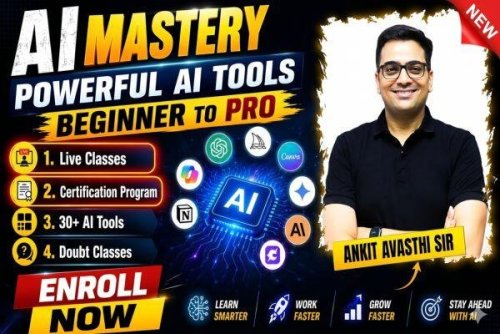 File Name: AI Mastery: From Beginner to Pro With Powerful AI Tools by Ankit Avasthi Sir Content Source: https://www.baatenbazarki.com/courses/Usage-of-AI-by-Ankit-Avasthi-Sir-69987f82d5c66269a3f812b7 Genre / Category: Coding Courses Language: HINDI Price: ₹2,999 ABOUT THE COURSE: AI Mastery: From Beginner to Pro With Powerful AI Tools. The future belongs to those who know how to use AI — and this course is your gateway to mastering it. AI Mastery is a comprehensive, hands-on course designed to take you from zero to confident AI user across 30+ of the most powerful tools available today. Unlike courses that focus on just one platform, this program introduces you to the full AI ecosystem — covering ChatGPT, Claude, Google Gemini, DeepSeek, Grok, Leonardo AI, ElevenLabs, Suno, Canva AI, Cursor, and many more. Action-packed classes led by Ankit Avasthi Sir, you will learn how AI actually works under the hood, how to write powerful prompts, how to generate stunning images, videos, and music, how to build modern websites without writing a single line of code, and how to automate everyday tasks to save time and boost your productivity. Whether you want to grow a YouTube channel, ace your studies, build a freelancing career, or simply stay ahead in a fast-changing world — this course gives you the practical skills and real-world workflows to do it all with AI. By the end of this course, you will be able to confidently operate multiple AI platforms, build AI-powered workflows, and stay adaptable as new tools continue to emerge.Free
 -
 File Name: [Apna College] Prime 2.0 - Complete AI/ML Batch Content Source: https://www.apnacollege.in/course/prime-2 Genre / Category: Premium Courses Language: HINDI Original Price: ₹6,880Free
 -
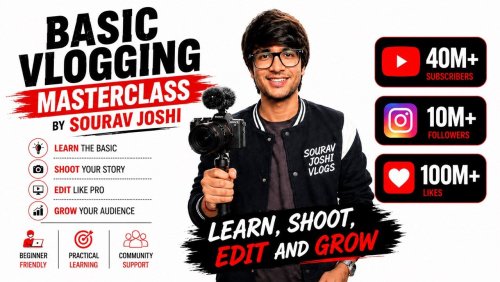 File Name: Sourav Joshi - Basic Vlogging Masterclass Content Source: https://play.google.com/store/apps/details?id=com.maztvn.zrrnnx Genre / Category: Premium courses Password: Original Price: ₹999 Language: HINDI For Paid User Without URL Shortener: Download : GO TO SINGLE CLICK DOWNLOAD PAGEFree
 -
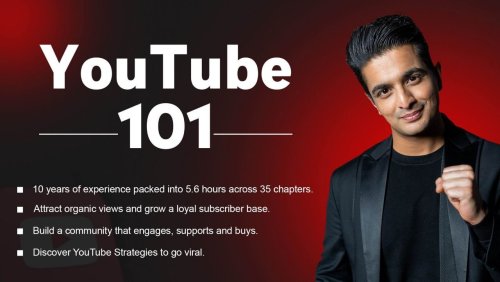 File Name: BeerBiceps - Youtube 101 Course Content Source: https://youtube.beerbicepsskillhouse.in/youtube-101/ Genre / Category: Exclusive courses Language: HINDI Price: ₹1,699Free
 -
 File Name: Decoding DevOps – From Basics to Advanced Projects with AI Content Source: https://www.udemy.com/course/decodingdevops/ Genre / Category: Coding Courses Language: ENGLISH Original Price: $99 ABOUT THE COURSE: This course is designed for anyone who wants to start or advance their DevOps career through hands-on, project-based learning. You’ll begin with Linux, networking, and scripting fundamentals, then progress through key DevOps tools — Git, Jenkins, GitHub Actions, GitLab, Terraform, Ansible, Docker, Kubernetes, and AWS Cloud. Each step builds on the last with real projects, like setting up the Vprofile application across multiple DevOps stages — from on-premise to AWS to Kubernetes. The course also introduces AI-powered tools such as GitHub Copilot, Amazon Q, and AI-integrated Helm, helping you automate faster, code smarter, and build intelligent DevOps pipelines. And now — introducing the brand-new Monitoring & Observability section, where you’ll learn how to collect, visualize, and analyze metrics, logs, and traces using tools like Prometheus, Grafana, Loki, and Alloy. By the end, you’ll master both the core DevOps practices and modern AI-driven workflows, preparing you for real-world cloud and automation environments. Step-by-Step Learning Path Step 1 Basics of Linux Server Management in Linux Vagrant Basics of Networking Project: VProfile Project Intro & Setup on VMs Step 2 YAML & JSON Bash Scripting (Variables, Conditions, Loops) Automating Admin Tasks GitHub Copilot as AI Assistant for Scripting Step 3 Cloud Computing Intro IAM, EC2, EBS, ELB SSM & CloudShell Intro AWS CLI, S3, CloudWatch, RDS, Auto Scaling, Route53 Project: Lift & Shift Web App to AWS Re-Architecting Web App on AWS (PaaS & SaaS) Step 4 Git & GitHub Maven Build Tools Jenkins (CI/CD Pipelines, Master/Slave, Nexus, SonarQube) GitHub Actions (Workflows, Runners, Security Scans) GitLab CI/CD (Pipelines, Stages, Docker Integration) Step 5 Python Scripting Automating OS Tasks Python for AWS using Amazon Q (AI) Step 6 Terraform Fundamentals (Variables, Modules, Backends) Infrastructure as Code for VPC Setup Step 7 – Monitoring & Observability Introduction to Monitoring & Observability Why Monitoring is Essential for DevOps Setting up Prometheus, Grafana, Loki, and Alloy Writing Queries with PromQL Connecting Grafana Data Sources Building Dashboards and Alerts Slack Integrations for Real-Time Notifications Integrating Loki and Alloy for Logs and Metrics Step 8 Ansible Intro Ad Hoc Commands, Modules, YAML Basics Playbooks, Variables, Conditions, Loops Handlers, Templates, Roles Ansible for AWS Automation Step 9 AWS (VPC Deep Dive, Lambda, Logging, Custom Metrics) Project: CI/CD on AWS – Beanstalk, RDS, CodePipeline Step 10 Project: Google cloud platform for multi tier app setup GCP Cloud shell VPC Firewalls VMs Cloud SQL & Memorystore Cloud DNS Managed Instance groups Secure HTTPS Load Balancers Certificate Manager Step 11 Docker (Containers, Images, Volumes, Networks) Kubernetes (Setup, Objects, Autoscaling, Ingress, ConfigMaps) Helm with AI, Lens Project: VProfile Deployment on Kubernetes Step 12 Project on GitOpsFree
 -
 File Name: Professor of How : Revolutionize Your Content Creation Content Source: https://professorofhow.com/ Genre / Category: Exclusive courses Language: HINDI Price: ₹4,997 FREE DOWNLOAD FOR MEMBERSHIP USERS: Download : GO TO DOWNLOAD PAGE99.00 INR
 -
 File Name: Complete Microservices with Go Content Source: https://www.udemy.com/course/complete-microservices-with-go/ Genre / Category: Coding Courses Language: ENGLISH Original Price: $99 ABOUT THE COURSE: In this project‑driven course, you’ll build the backend microservices system for a Uber‑style ride‑sharing app from the ground up—using Go, Docker, and Kubernetes. The course includes an introduction to Advanced Go mini-course, so you can expect the full package if you are new to Go. By the end, you’ll have a fully deployed, horizontally scalable ride‑sharing system that’s ready for real traffic. Plus, you’ll walk away with reusable template for building future distributed projects—accelerating your path to become a lead engineer. The project we'll build is composed of multiple services that are orchestrated with Kubernetes, you have this beautiful UI, where if you click on the map you’ll be able to preview a route to your destination and then by selecting the desired package, request a ride from a pool of available drivers. This course aims to provide you with the foundational knowledge required to build and understand distributed backend systems, implement industry best practices, and create production-ready microservices architecture that are scalable and maintainable. It is not just a step-by-step tutorial, but a comprehensive learning experience that prepares you for real-world scenarios.Free
 -
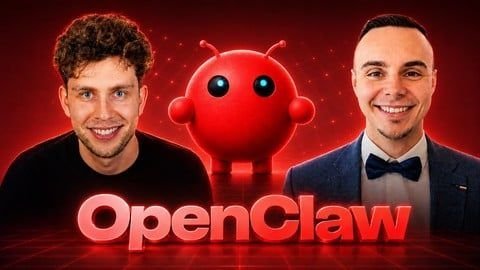 File Name: OpenClaw: Run Powerful & Autonomous AI Agents Securely Content Source: https://www.udemy.com/course/openclaw-course/ Genre / Category: Coding Courses Language: ENGLISH Original Price: $99 ABOUT THE COURSE: The fastest-growing open-source project in GitHub history — already past 350,000 stars — and it's a free, personal AI agent that actually works for you. If you're a freelancer — imagine waking up to competitor reports, client emails, and task updates already handled. If you're a business owner — imagine an agent that manages files, browses the web, sends emails, and runs on autopilot while you focus on growth. If you're a developer or tech enthusiast — imagine building your own mission control dashboard, second brain, and automated workflows with a real AI agent under your full control. That's exactly what OpenClaw gives you. And this course shows you how to set it up, secure it, and put it to work — from day one. OpenClaw is a free, open-source AI agent that lives on your own device — your computer, a VPS, or dedicated hardware. You message it through Telegram or WhatsApp like you'd message a friend, and it takes real action: managing files, browsing the web, sending emails, scheduling tasks, running commands, and connecting to all your favourite apps. In this complete, hands-on course, you'll learn how to install, configure, and secure OpenClaw the right way — even if you've never done anything like this before. This is not just another setup tutorial. You'll go from zero all the way to building real projects, real automations, and your own custom Mission Control Dashboard — step by step. By the end of this course, you'll have a fully working personal AI agent that runs for you every single day — handling tasks, delivering reports, managing your knowledge base, and saving you hours of repetitive work. You'll also get 100+ ready-to-use prompts, 10+ detailed PDF guides (including a full AI Models reference, a production deployment checklist, and a second brain setup guide), plus lifetime access to our private student community. What You'll Learn in This Course: Section 1: Course Introduction Understand what OpenClaw is, who built it, and why it matters in the personal AI space See how OpenClaw compares to Claude Code, Cowork, n8n, and other AI tools — and when to use each one Discover 6 real-world use cases that show what OpenClaw can do for you right now Get access to all the tools, links, and resources you need before diving in Section 2: Setting Up OpenClaw Choose where to run your agent — locally on Mac, Linux, or Windows, or on a cloud VPS — and set it up from scratch Install OpenClaw, connect it to Telegram, and launch your agent for the first time Get a full walkthrough of the gateway dashboard so you feel confident navigating everything Harden your agent's security and learn how to manage API costs from the start Section 3: Models & Cost Control Understand the different AI model tiers, their real costs, and how to pick the right one for your needs Set up smart model routing and free fallback models so your agent keeps running without burning through credits Run OpenClaw for free or near-free using local models and open-source alternatives Section 4: Everyday Features, Integrations & Skills Use voice mode, organise your Telegram with groups, and install Google Workspace to supercharge your agent Understand Skills — how they work, how to stay safe, and how they extend what your agent can do Build your first mini project: a full email automation powered by your agent Section 5: Real Projects with Your Agent Set up your agent's workspace files, memory, and identity so it remembers context and works the way you want Set up cron jobs and use sub-agents so OpenClaw handles bigger tasks on autopilot Build real projects: a landing page with sub-agents, an automated competitor watch report, and a daily intelligence digest Create a second AI brain with Obsidian and connect it to your agent for powerful knowledge management Section 6: Advanced Security Set up safe remote access to your server with SSH and Tailscale VPN Protect your agent against prompt injection attacks and keep all connections secure Get a production deployment checklist so you can trust your agent with real, sensitive work Section 7: Mission Control Dashboard Build your own personal command centre with a task board, calendar, projects, documents, and financial tracker Add a daily standup screen, team view, and memories panel — then customise it to fit your workflow Access Mission Control from your phone and optionally make it publicly available with Caddy Section 8: Keeping It Running & Moving Forward Handle updates, backups, snapshots, and recovery so your agent stays reliable long-term Troubleshoot common issues and migrate your setup when needed Find your own use cases, connect with the OpenClaw community, and keep building on what you've learned Now, why should we teach you this topic? Damian Danelczyk is an AI Engineer by education, with a degree in AI & Software Engineering and nearly 15 years of hands-on programming experience. He runs his own AI Automation Agency and works with these tools every day — building real systems for real clients. When it comes to OpenClaw, Damian brings the practitioner's perspective: security, architecture, and making things actually work in production. Krystian Wojtarowicz is an educator and course creator with 45+ courses and tens of thousands of students worldwide. He specialises in translating complex AI and automation topics into clear, step-by-step learning that actually sticks — so you never feel lost, even if this is your very first time working with an AI agent. Build your own personal AI agent, secure it properly, and put it to work on real tasks — every single day.Free
 -
 File Name: OpenClaw: Run Powerful & Autonomous AI Agents Securely Content Source: https://www.udemy.com/course/openclaw-run-powerful-autonomous-ai-agents-securely/ Genre / Category: Coding Courses Language: ENGLISH Original Price: $99 ABOUT THE COURSE: Stop renting AI. Start owning your digital workforce. You’ve used ChatGPT, Claude, Gemini, maybe also n8n, and you’ve seen AI agents. But have you ever had a true AI Employee that lives on your server, manages your files, codes itself, and pings you on Telegram when the job is done? Welcome to the OpenClaw Masterclass. This course is your blueprint for building a fully autonomous, privacy-focused AI ecosystem. Whether you want a local assistant running on your laptop or a 24/7 digital worker on a VPS, OpenClaw is the framework that makes it happen. We move beyond simple "chat" interfaces. You will learn to deploy OpenClaw, an agent with a Soul, a Heartbeat, and a distinct Identity. It doesn't just answer; it proactively works for you using tools and memory files that you control. You will learn how to orchestrate LLMs to hear you (Whisper), see your files, execute commands, and even manage other AIs (like Claude Code, OpenCode or Codex) to write software. What You’ll Get: Real-World Deployments: Set up OpenClaw locally (Windows/Mac/Linux) or as a remote VPS employee. The "Soul" Architecture: Deep dive into the configuration files (Soul, Identity, User) that make your agent unique. Custom Skills: Build agents that can send emails, generate images locally, browse the web, and manage your calendar. Cost-Saving Strategies: Learn smart model routing, prompt caching, and local model integration to run AI almost for free. Security Best Practices: Complete guides on firewalls, SSH hardening, and safe skill installation. What You’ll Learn in This Course: Foundations: The OpenClaw Ecosystem Start strong by setting up your command center. Universal Installation: Master the setup on Linux, macOS, Windows, or Docker. Onboarding: Configure Telegram, WhatsApp, iMessage or Slack to be your primary interface and control your AI from anywhere in the world. Hooks & Plugins: Configure Hooks so OpenClaw "remembers" you and proactively notifies you via Telegram when tasks are done. Designing the AI's Personality (The Core Files) Don't just build a bot—create a digital being. The Soul File: Learn to write the DNA of your agent. Define its core purpose, ethical boundaries, and personality traits. The Identity File: Give your agent a specific persona and tone. The User File: Teach the agent who you are. Store your preferences, bio, and working style so the AI adapts to you. The Agent File: The operational brain. Define how the agent processes information and prioritizes tasks. The Heartbeat: The rhythm that keeps your agent alive. Configure the Heartbeat file to trigger background tasks and autonomy. Local Power: Privacy, Voice & Vision Turn your local machine into an AI powerhouse. File System Mastery: Give OpenClaw the ability to access, organize, and modify your PC files remotely. Voice Input: Talk to OpenClaw naturally using Whisper and FFmpeg integration. Local Image Generation: Create custom Tools to trigger ComfyUI workflows directly from your chat. Agentic Coding: Watch OpenClaw modify its own settings and orchestrate tools like Claude Code or Codex for software development. Context Management & Cost Optimization Make your AI smarter while spending less. Ollama Integration: Run models offline, privately, and for free using your own hardware. Context Engineering: Master context files and sessions so your agent "remembers" complex projects without hallucinating. Smart Economics: Implement prompt caching, smart model routing, and "lean init" strategies to drastically reduce API bills. The VPS Employee: 24/7 Automation & DevOps Deploy a separate digital employee that works while you sleep. VPS Deployment: A step-by-step guide to hosting OpenClaw on a Virtual Private Server. Google Cloud & Email: Automate your inbox and integrate deeply with Google Services. Deep Research: Enable web fetching and browser automation (via Brave, Playwright & Perplexity) to have your agent scour the internet for you. Cron Jobs & Cronos: Set up complete automated schedules: Your agent wakes up, does the work, and reports back. Advanced Security & The Future Protect your digital asset and stay ahead. Server Security: Learn essential DevOps skills: Closing ports, configuring firewalls, and securing SSH to keep your agent safe. MoltBook: Discover the "New Internet for AI Agents" and how to leverage it. Skill Expansion: Learn the difference between safe and unsafe skill installation methods. Become the Architect of Your Own AI Force! By the end of this course, you won't just be using AI... You will be managing a robust, autonomous system that works for you. You will understand how to manipulate the Soul file to change behavior, how to use the Heartbeat to create autonomy, and how to secure your digital employee.Free
 -
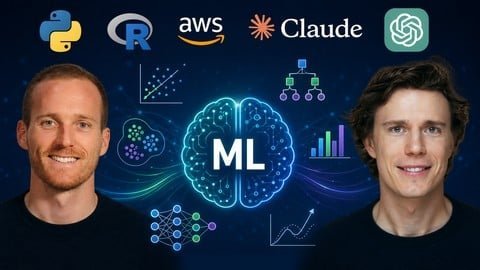 File Name: Machine Learning A-Z [2026]: ML, DL, AI with AWS, Python & R Content Source: https://www.udemy.com/course/machinelearning/ Genre / Category: Coding Courses Language: ENGLISH Original Price: $99 ABOUT THE COURSE: This course has been designed by two AI & Machine Learning experts so that we can share our knowledge and help you learn complex theory, algorithms, and coding libraries in a simple way. We will walk you step-by-step into the World of Machine Learning. With every tutorial, you will develop new skills and improve your understanding of this challenging yet lucrative sub-field of Data Science. This course can be completed by doing either the AWS tutorials, Python tutorials, or R tutorials, or the three of them - AWS, Python & R. Pick the ones you need for your career. This course is fun and exciting, and at the same time, we dive deep into Machine Learning. It is structured the following way: Part 1 - Data Preprocessing: Importing the dataset with pandas, Matrix of Features and Target Vector, Training & Test Sets, Imputing Missing Data, Encoding Categorical Variables, Feature Scaling Part 2 - Regression: Simple Linear Regression, Multiple Linear Regression, Polynomial Regression, SVR, Decision Tree Regression, Random Forest Regression Part 3 - Classification: Logistic Regression, K-NN, SVM, Kernel SVM, Naive Bayes, Decision Tree Classification, Random Forest Classification Part 4 - Clustering: K-Means, Hierarchical Clustering Part 5 - Association Rule Learning: Apriori, Eclat Part 6 - Reinforcement Learning: Upper Confidence Bound, Thompson Sampling Part 7 - Natural Language Processing: Bag-of-words model and algorithms for NLP Part 8 - Deep Learning: Artificial Neural Networks, Convolutional Neural Networks Part 9 - Dimensionality Reduction: PCA, LDA, Kernel PCA Part 10 - Model Selection & Boosting: k-fold Cross Validation, Parameter Tuning, Grid Search, XGBoost Part 11 - ML Data Preprocessing with AWS: Data types (Apache Parquet, JSON, CSV), Data Preparation with S3, ETL with AWS Glue, Data Wrangling with AWS Glue DataBrew & SageMaker Data Wrangler, Feature Engineering with SageMaker Part 12 - ML Model Development with AWS: XGBoost, LightGBM, CatBoost, Ensemble Models, Hyperparameter Tuning Techniques, Building Ensemble Models for Regression & Classification with Amazon SageMaker AI, Natural Language Processing with Amazon Comprehend, Computer Vision with Amazon Rekognition, Text to Speech with Amazon Polly, Speech To Text with Amazon Transcribe, Text Extraction with Amazon Textract, Machine Translation with Amazon Translate Part 13 - ML Model Deployment with AWS: Methods for Deploying Models in Production, Deployment in Amazon SageMaker AI, Serverless vs. Real-Time vs. Asynchronous Inference, Deployment Endpoints in Amazon SageMaker, SageMaker vs. ECS vs. EKS vs. Lambda Deployment Targets, CloudFormation & Cloud Development Kit (CDK), Elastic Container Registry (ECR), Elastic Container Service (ECS) & Fargate, Building Containers with Amazon ECR, ECS & EKS Part 14 - ML Workflow Automation (CI/CD Pipelines) with AWS: AWS CodePipeline, AWS CodeBuild, AWS CodeCommit, AWS CodeDeploy, Creating an ML pipeline with Amazon SageMaker Pipelines Part 15 - ML Solution Monitoring and Maintenance with AWS: Features of Responsible AI, Legal Risks of Generative AI, Tools for Responsible ML, Model/Data Quality and Bias Drift with SageMaker Clarify, Monitoring Models in Production with SageMaker Model Monitor, SageMaker Model Cards, SageMaker Inference Recommender, SageMaker Savings PlansFree
 -
 File Name: The AI Engineer Course 2026: Complete AI Engineer Bootcamp Content Source: https://www.udemy.com/course/the-ai-engineer-course-complete-ai-engineer-bootcamp/ Genre / Category: Coding Courses Language: ENGLISH Original Price: $99 ABOUT THE COURSE: AI Engineers are best suited to thrive in the age of AI. It helps businesses utilize Generative AI by building AI-driven applications on top of their existing websites, apps, and databases. Therefore, it’s no surprise that the demand for AI Engineers has been surging in the job marketplace. Supply, however, has been minimal, and acquiring the skills necessary to be hired as an AI Engineer can be challenging. So, how is this achievable? Universities have been slow to create specialized programs focused on practical AI Engineering skills. The few attempts that exist tend to be costly and time-consuming. Most online courses offer ChatGPT hacks and isolated technical skills, yet integrating these skills remains challenging. The Solution AI Engineering is a multidisciplinary field covering: AI principles and practical applications Python programming Natural Language Processing in Python Large Language Models and Transformers Developing apps with orchestration tools like LangChain Vector databases using PineCone Creating AI-driven applications Each topic builds on the previous one, and skipping steps can lead to confusion. For instance, applying large language models requires familiarity with Langchain—just as studying natural language processing can be overwhelming without basic Python coding skills. So, we created the AI Engineer Bootcamp 2025 to provide the most effective, time-efficient, and structured AI engineering training available online. This pioneering training program overcomes the most significant barrier to entering the AI Engineering field by consolidating all essential resources in one place. Our course is designed to teach interconnected topics seamlessly—providing all you need to become an AI Engineer at a significantly lower cost and time investment than traditional programs. The Skills 1. Intro to Artificial Intelligence Structured and unstructured data, supervised and unsupervised machine learning, Generative AI, and foundational models—these are familiar AI buzzwords; what exactly do they mean? Why study AI? Gain deep insights into the field through a guided exploration that covers AI fundamentals, the significance of quality data, essential techniques, Generative AI, and the development of advanced models like GPT, Llama, Gemini, and Claude. 2. Python Programming Mastering Python programming is essential to becoming a skilled AI developer—no-code tools are insufficient. Python is a modern, general-purpose programming language suited for creating web applications, computer games, and data science tasks. Its extensive library ecosystem makes it ideal for developing AI models. Why study Python programming? Python programming will become your essential tool for communicating with AI models and integrating their capabilities into your products. 3. Intro to NLP in Python Explore Natural Language Processing (NLP) and learn techniques that empower computers to comprehend, generate, and categorize human language. Why study NLP? NLP forms the basis of cutting-edge Generative AI models. This program equips you with essential skills to develop AI systems that meaningfully interact with human language. 4. Introduction to Large Language Models This program section enhances your natural language processing skills by teaching you to utilize the powerful capabilities of Large Language Models (LLMs). Learn critical tools like Transformers Architecture, GPT, Langchain, HuggingFace, BERT, and XLNet. Why study LLMs? This module is your gateway to understanding how large language models work and how they can be applied to solve complex language-related tasks that require deep contextual understanding. 5. Building Applications with LangChain LangChain is a framework that allows for seamless development of AI-driven applications by chaining interoperable components. Why study LangChain? Learn how to create applications that can reason. LangChain facilitates the creation of systems where individual pieces—such as language models, databases, and reasoning algorithms—can be interconnected to enhance overall functionality. 6. Vector Databases With emerging AI technologies, the importance of vectorization and vector databases is set to increase significantly. In this Vector Databases with Pinecone module, you’ll have the opportunity to explore the Pinecone database—a leading vector database solution. Why study vector databases? Learning about vector databases is crucial because it equips you to efficiently manage and query large volumes of high-dimensional data—typical in machine learning and AI applications. These technical skills allow you to deploy performance-optimized AI-driven applications. 7. Speech Recognition with Python Dive into the fascinating field of Speech Recognition and discover how AI systems transform spoken language into actionable insights. This module covers foundational concepts such as audio processing, acoustic modeling, and advanced techniques for building speech-to-text applications using Python.Free
 -
 File Name: Krish Naik - Complete MCP Bootcamp: Build Next-Gen AI Agents with MCP Content Source: https://www.udemy.com/course/complete-mcp-bootcamp-build-next-gen-ai-agents-with-mcp/ Genre / Category: Premium courses Password: Original Price: $49 Language: ENGLISH For Paid User Without URL Shortener: Download : GO TO SINGLE CLICK DOWNLOAD PAGE ABOUT THE COURSE: The Model Context Protocol (MCP) is transforming how modern AI systems operate. It is the emerging standard that allows Large Language Models (LLMs) to interact intelligently with external tools, APIs, and data sources. By learning MCP, you will understand how context flows between AI models and their environments, enabling the creation of truly autonomous and context-aware systems. This course, Complete Model Context Protocol (MCP) Bootcamp, provides an in-depth understanding of how MCP works and how to implement it effectively in real-world AI applications. You will explore MCP’s architecture, its role in the Agentic AI ecosystem, and how it integrates with frameworks like LangChain, LangGraph, and CrewAI. The course is fully practical, project-based, and designed for professionals who want to build advanced AI workflows. Introduction to Model Context Protocol (MCP): Understand what MCP is and why it was introduced. Learn how MCP changes the way LLMs communicate and share information. Explore the problems MCP solves in modern Generative AI development. Core Concepts and Architecture: Study the main components of MCP, including models, tools, and context layers. Understand how context is represented, managed, and exchanged. Learn the design principles that make MCP scalable and extensible. Building AI Systems with MCP: Implement MCP-driven workflows using Python. Connect language models with real-world APIs and databases. Create context-aware applications capable of retrieving and reasoning with live data. Build retrieval-augmented systems that integrate knowledge retrieval and response generation. Integration with Leading Frameworks: Use MCP with LangChain to enhance RAG pipelines. Integrate MCP with LangGraph for stateful and graph-based reasoning. Combine MCP with CrewAI to create multi-agent architectures. Understand how MCP works with open-source and cloud-based LLMs such as OpenAI, Anthropic, and Mistral. Projects You Will Build: Project 1: Build a context-aware AI assistant using MCP. Project 2: Connect an LLM to real-world APIs through MCP. Project 3: Create an Autonomous RAG system with LangChain and MCP. Project 4: Develop a multi-agent workflow using CrewAI and MCP. Project 5: Deploy an MCP-powered AI system using Docker and GitHub Actions. Security, Deployment, and Optimization: Learn best practices for securing MCP communications and configurations. Set up environments with Docker and VS Code for reproducible workflows. Automate deployments and testing with GitHub Actions. Who Should Take This Course: AI engineers looking to build context-aware and autonomous systems. Data scientists and ML developers exploring Agentic AI architectures. Software engineers who want to connect LLMs with APIs and external tools. Researchers and students interested in the evolution of context engineering. Key Learning Outcomes: Gain a complete understanding of how MCP enables structured model-to-tool communication. Learn how to design and deploy intelligent systems that use dynamic context. Acquire practical experience through multiple end-to-end projects. Master the integration of MCP with frameworks used in modern AI development. Technologies and Tools Covered: Model Context Protocol (MCP) LangChain, LangGraph, CrewAI Python, OpenAI, Mistral, Anthropic Vector Databases (FAISS, Chroma, Pinecone) Docker, GitHub Actions, VS Code About the Instructor: Krish Naik has over 13 years of experience in the data analytics and AI industry and more than 7 years of experience teaching Machine Learning, Deep Learning, NLP, and Generative AI. Known for his practical, hands-on teaching approach, he has trained millions of learners to master real-world AI and data science concepts. By the end of this course, you will have the skills to design, implement, and deploy MCP-powered AI systems. You will understand how MCP redefines model communication, how it enhances RAG systems, and how it enables the creation of intelligent, connected, and scalable Agentic AI applications.Free
 -
 File Name: Davey and Krista - Design Strategy School Content Source: https://daveyandkrista.com/design-school/ Genre / Category: Coding Courses Language: ENGLISH Original Price: $2,999 ABOUT THE COURSE: Design Strategy School is a complete, step-by-step system that teaches you how to design, price, sell, and deliver strategic brands and websites—so you can stop guessing, stop undercharging, and build a studio that actually supports your life. Built from a $100k design education and 15+ years of real client work—broken down into a clear, repeatable framework you can use on every project. You will learn how to: • Design brands and websites rooted in strategy—not trends • Build offers that feel aligned and profitable • Create a portfolio that attracts premium clients • Sell your work with confidence (without feeling salesy) • Deliver a polished client experience with repeatable systems • Explain your design decisions like a creative director MODULE ONE: Studio CEO Essentials • Set up pricing, workflows, and client systems that save time • Create a professional process clients trust • Position your website to sell for you MODULE TWO: Design Principles • Master the core principles that make designs feel intentional and high-end • Train your eye so you can confidently say why something works • Apply these fundamentals to brands, websites, and templates MODULE THREE: Elements of Design • Use color, typography, layout, and spacing with intention • Build visual systems that guide users and support conversion • Move from “pretty” to purposeful design decisions MODULE FOUR: Brand & Logo Design • Build strategic brand concepts—not just logos • Present and refine work without endless revisions • Deliver polished brand assets clients love MODULE FIVE: Customize a Showit Site • Create Showit websites with strategy and structure • Manage website projects from start to launch • Deliver sites that look good and convert well for your clients MODULE SIX: Marketing for Designers • Get found online without doing “all the platforms.” • Create content that drives inquiries—not just engagement • Build visibility systems that don’t rely on hustle MODULE SEVEN: Build Your Mailing List • Start and grow a healthy email list from scratch • Create lead magnets that actually convert • Set up automated sequences that build trust and sell MODULE EIGHT: Paid Advertising • Design ads that feel aligned with your brand • Understand targeting, audiences, and tracking • Use ads as a tool to increase revenue MODULE NINE: Portfolio Projects • Work through real-world design scenarios • Create diverse, strategic projects you’re proud to show • Build confidence through guided practiceFree
 -
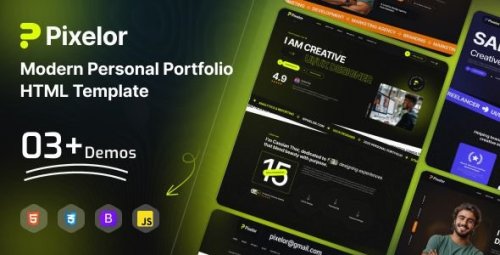
Pixelor - Modern Personal Portfolio HTML Template File Name: Pixelor – Modern Personal Portfolio HTML Template Content Source: https://themeforest.net/item/pixelor-modern-personal-portfolio-html-template/62457877 Genre / Category: Codes & Resources Original Price: $7 ABOUT THIS FILE: Pixelor is a clean, modern, and highly creative HTML template designed for individuals who want to showcase their work with style and professionalism. Perfect for developers, designers, freelancers, photographers, and digital professionals, Pixelor helps you build a powerful online presence and leave a lasting impression. Crafted with attention to detail, Pixelor combines minimal design, smooth interactions, and high performance. Its flexible and well-structured layout makes customization simple—whether you’re just starting out or an experienced developer. Present your skills, portfolio, and achievements in a visually engaging way where simplicity meets creativity. Key Features:Modern & Clean Design Elegant and minimal layout tailored for personal portfolios and creative professionals. Multiple Homepage Variations Choose from stylish layouts to match your personal brand and identity. Fully Responsive Layout Optimized for all devices including desktops, tablets, and smartphones. Smooth Animations Engaging transitions and effects powered by modern animation libraries. Developer-Friendly Code Clean, well-commented HTML5, CSS3, and Bootstrap 5+ code for easy customization. Portfolio Showcase Beautiful project layouts to highlight your work and achievements. SEO Optimized Structured for better search engine visibility and faster performance. Cross-Browser Compatibility Works flawlessly across all modern browsers. Template Highlights:3 Stunning Homepage Layouts 13 Ready-to-Use Inner Pages Creative & Minimal Personal Portfolio Design Multiple Home & Inner Pages Fully Customizable Layout Structure Clean & Well-Organized Code Free Fonts & Icons Included Bootstrap 5+ Framework Smooth GSAP Animations & Interactive Elements Fully Responsive & Retina Ready User-Friendly Interface Fast Loading Speed Cross-Browser Support Detailed Documentation File Information Submitter THEE DARK Submitted 05/25/2026 Category Codes & Resources Sale page https://themeforest.net/item/pixelor-modern-personal-portfolio-html-template/62457877 View File
-
File Name: Pixelor – Modern Personal Portfolio HTML Template Content Source: https://themeforest.net/item/pixelor-modern-personal-portfolio-html-template/62457877 Genre / Category: Codes & Resources Original Price: $7 ABOUT THIS FILE: Pixelor is a clean, modern, and highly creative HTML template designed for individuals who want to showcase their work with style and professionalism. Perfect for developers, designers, freelancers, photographers, and digital professionals, Pixelor helps you build a powerful online presence and leave a lasting impression. Crafted with attention to detail, Pixelor combines minimal design, smooth interactions, and high performance. Its flexible and well-structured layout makes customization simple—whether you’re just starting out or an experienced developer. Present your skills, portfolio, and achievements in a visually engaging way where simplicity meets creativity. Key Features:Modern & Clean Design Elegant and minimal layout tailored for personal portfolios and creative professionals. Multiple Homepage Variations Choose from stylish layouts to match your personal brand and identity. Fully Responsive Layout Optimized for all devices including desktops, tablets, and smartphones. Smooth Animations Engaging transitions and effects powered by modern animation libraries. Developer-Friendly Code Clean, well-commented HTML5, CSS3, and Bootstrap 5+ code for easy customization. Portfolio Showcase Beautiful project layouts to highlight your work and achievements. SEO Optimized Structured for better search engine visibility and faster performance. Cross-Browser Compatibility Works flawlessly across all modern browsers. Template Highlights:3 Stunning Homepage Layouts 13 Ready-to-Use Inner Pages Creative & Minimal Personal Portfolio Design Multiple Home & Inner Pages Fully Customizable Layout Structure Clean & Well-Organized Code Free Fonts & Icons Included Bootstrap 5+ Framework Smooth GSAP Animations & Interactive Elements Fully Responsive & Retina Ready User-Friendly Interface Fast Loading Speed Cross-Browser Support Detailed DocumentationFree


